
How to Identify a Scam Email: Your Essential Guide
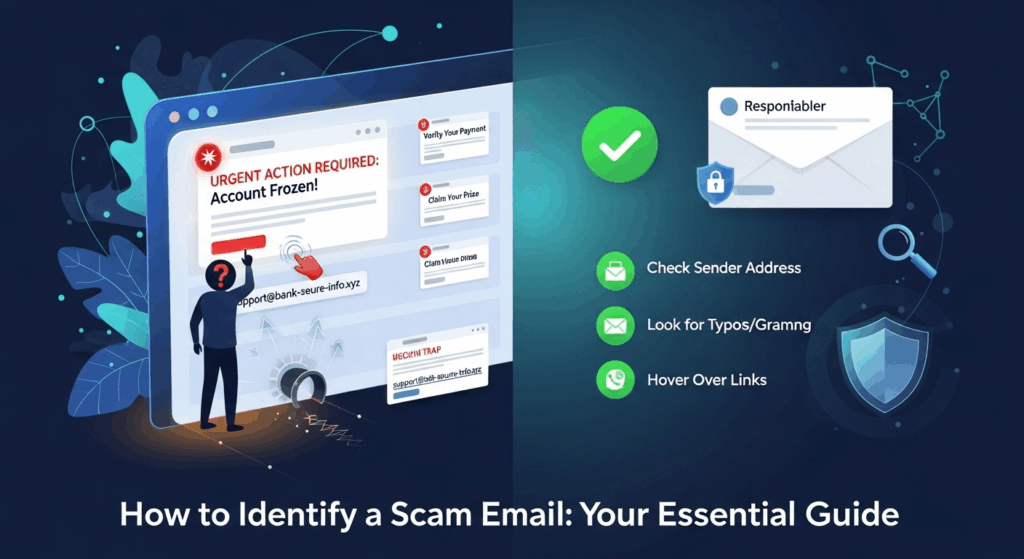
In today's hyper-connected world, your email inbox is more than just a communication tool; it's a gateway to your digital life. It holds everything from personal conversations to financial statements and account recovery links. Unfortunately, this makes it a prime target for cybercriminals. Phishing attacks, a form of email-based scam, are not only becoming more frequent but also more sophisticated, making it crucial for everyone to understand the warning signs. Knowing how to identify a scam email is no longer just a technical skill for IT professionals—it's an essential life skill for anyone who uses the internet. This comprehensive guide will equip you with the knowledge and tools to dissect suspicious emails, protect your personal information, and navigate your digital life with confidence.
Understanding the Threat: What Are Scam Emails?
Before you can effectively spot a scam, it's vital to understand what it is and what its perpetrators hope to achieve. At its core, a scam email is a fraudulent message designed to trick you into performing an action you shouldn't. This action could be revealing sensitive personal information, clicking on a malicious link, or transferring money. These emails are the primary vehicle for what is known as phishing, a term inspired by the idea of "fishing" for victims' data using deceptive bait. The ultimate goal for these scammers is almost always financial gain, whether directly through a fraudulent transfer or indirectly by stealing credentials to sell on the dark web or use for identity theft.
The effectiveness of these scams lies in their masterful use of social engineering—the psychological manipulation of people into performing actions or divulging confidential information. Scammers don't just hack into systems; they hack into human trust and emotion. They create scenarios that trigger a sense of urgency, fear, curiosity, or even greed, bypassing your logical thinking and prompting an impulsive reaction. They might impersonate a trusted entity like your bank, a government agency (like the IRS or post office), a popular streaming service, or even your own company's CEO.
Understanding this psychological element is a key part of learning how to identify a scam email. The message is crafted to make you feel that you must act now or face a negative consequence, such as having your account locked, facing a legal penalty, or missing out on a once-in-a-lifetime opportunity. By recognizing that these emotional triggers are a deliberate tactic, you can train yourself to pause, think critically, and inspect the email for the technical red flags that inevitably give the scam away.
Phishing vs. Spear Phishing: Know Your Enemy
While the term "phishing" is often used as a catch-all, it's important to understand its more targeted and dangerous variant: spear phishing. A standard phishing email is like a wide net cast into the ocean; it's sent to thousands or millions of people with a generic message, hoping that a small percentage will fall for the bait. These are often the "Your account has been suspended" or "You've won a prize" emails that are relatively easy to spot due to their generic nature.
Spear phishing, on the other hand, is a far more personalized and insidious attack. In this scenario, the scammer has done their homework on you or your organization. They may know your name, your job title, your colleagues, or recent projects you've been working on. The email will appear to come from a trusted source, like your boss or a vendor you work with, and will contain specific details that make it seem incredibly legitimate. For example, an attacker might target an accounting professional with an email seemingly from the CFO, requesting an urgent wire transfer for a project they know is in progress. Because of this high level of personalization, spear phishing attacks have a much higher success rate and can cause significant financial and reputational damage.
The Psychology Behind Scams: Why They Work
Scammers are masters of manipulation, and their emails are carefully crafted to exploit common human psychological triggers. The most powerful of these is a sense of urgency or fear. Phrases like "Urgent Action Required," "Account Suspension Notice," or "Unusual Sign-in Activity" are designed to induce panic. When you're afraid your bank account is compromised or your email is being hacked, your critical thinking skills can diminish, leading you to click a link or provide information without proper verification.
Another potent trigger is authority. Scammers frequently impersonate figures of authority, such as government agencies (e.g., tax offices, law enforcement) or high-level executives within your own company (a tactic known as CEO fraud or Business Email Compromise). We are socially conditioned to respond to requests from authority figures, and scammers leverage this trust. An email that appears to be from your CEO demanding an immediate transfer of funds for a "confidential deal" can pressure an employee into bypassing standard security protocols. Understanding thatこれらの (Japanese for "these") tactics are at play is the first step in building your defense.
The Anatomy of a Scam Email: Key Red Flags to Watch For
Even the most sophisticated scam emails contain clues and inconsistencies that can give them away. Learning to spot these red flags is the most practical skill you can develop to protect yourself. It requires you to become a digital detective, scrutinizing every part of the message before you even consider acting on it. From the sender's address to the fine print, every element is an opportunity to uncover the fraud.
The key is to develop a habit of skepticism. Treat every unexpected email, especially those asking for information or immediate action, as potentially suspicious until you can prove otherwise. This doesn't mean being paranoid; it means being diligent. Scammers rely on your inattention and trust. By slowing down and methodically checking for specific warning signs, you flip the script and use their own tactics against them. A few seconds of inspection can save you from hours of dealing with the fallout of a compromised account or identity theft.
Remember, legitimate organizations, especially banks and government agencies, have strict communication policies. They will rarely ask for sensitive information like passwords or Social Security numbers via email. They typically won't threaten you with immediate account closure over a trivial issue. Any email that breaks these unwritten rules should immediately raise your suspicion and trigger a more thorough investigation on your part.
The Sender's Information: A Deceptive First Impression
The "From" field is one of the first and most critical areas to inspect. Scammers have become adept at making this look legitimate at a quick glance, but a closer look often reveals the trick.
- Display Name Spoofing: A common technique is to make the display name look authentic while the actual email address is a random string of characters or from a public domain. For example, the email might say it's from "Netflix Support," but when you hover over or click on the name, the actual address is revealed as `netflix-support-1a2b3c@hotmail.com` or `secure-info@random-server.net`. Always check the full email address, not just the display name.
- Lookalike Domains: Scammers often register domains that are visually similar to legitimate ones, hoping you won't notice the difference. This is called typosquatting. For example, instead of `paypal.com`, they might use `paypa1.com` (with the number 1 instead of "l") or `paypal-support.com`. A legitimate company will almost always communicate from its primary domain. Be wary of any variations or subdomains that look suspicious.
Suspicious Links and Attachments: The Digital Traps
The primary goal of most phishing emails is to get you to click a link or open an attachment. This is where the real danger lies, as these actions can lead to credential-stealing websites or install malware on your device.
- The Hover-to-Reveal Technique: This is your most powerful tool. Never click a link in a suspicious email. Instead, on a desktop computer, hover your mouse cursor over the link. The actual destination URL will typically appear in the bottom-left corner of your browser window or in a small pop-up. If the linked text says `https://yourbank.com/login` but the hover-reveal shows a completely different and strange URL, it's a scam.
- The Threat of Unexpected Attachments: Be extremely cautious of any unsolicited attachments, especially if they are compressed files (like .zip or .rar) or executable files (.exe). Scammers often disguise malware as seemingly harmless documents like "Invoice.pdf" or "Shipping_Details.doc". If you aren't expecting a file from the sender, do not open it. If in doubt, contact the sender through a separate, verified communication channel (like their official website or phone number) to confirm they sent it.
The Language of Deception: Tone and Grammar
Professional organizations spend a significant amount of time and money on their customer communications. Their emails are typically well-written, professionally formatted, and free of grammatical errors. Scam emails, on the other hand, often betray their fraudulent nature through their language.
- Urgent and Threatening Tone: As mentioned, scammers use fear and urgency to their advantage. Watch for overly dramatic language like "Your account will be terminated in 24 hours," or "Law enforcement has been notified." Legitimate companies use a calm, professional tone. They will inform you of an issue and guide you on how to resolve it without resorting to threats.
- Spelling and Grammar Mistakes: While some scams are becoming more polished, many still contain glaring spelling errors, odd phrasing, or poor grammar. This is often because the scammers are not native English speakers, or they are using automated translation tools. A message from a major corporation like Apple or Microsoft filled with grammatical mistakes is a massive red flag.
Generic Greetings and Unexpected Requests
Personalization is a hallmark of legitimate communication. If your bank emails you, they will almost always use your name. Scammers who are casting a wide net often don't have this information.
- Vague Salutations: Be wary of emails that start with generic greetings like "Dear Valued Customer," "Dear Account Holder," or simply "Hello." While not always a sign of a scam, when combined with other red flags, it's highly suspicious. If a company you have a relationship with is contacting you about your specific account, they should know your name.
- Requests for Personal Information: This is the most crucial rule to remember. No legitimate company will ever email you and ask for your password, PIN, Social Security number, or full credit card details. If an email asks you to "verify your account" by entering this information into a form linked in the email, it is a scam 100% of the time. Legitimate sites will direct you to log in through their official website, which you should navigate to yourself, not by clicking the link.
Common Types of Email Scams You'll Encounter
Scammers are creative, but their methods often fall into recognizable patterns. Familiarizing yourself with these common scam archetypes can help you identify them more quickly. These scenarios are designed to exploit specific vulnerabilities, from our reliance on online services to our desire for financial gain.
By recognizing the script, you can immediately put your guard up. When an email fits one of these molds, you should automatically shift into a high-skepticism mindset and begin looking for the technical red flags discussed earlier. It is this combination of pattern recognition and technical verification that forms the strongest defense against phishing attacks.
The "Urgent Account Problem" Scam
This is arguably the most common type of phishing scam. The email will impersonate a service you likely use, such as Netflix, Amazon, Apple, or your bank. It will claim there's a problem with your account—a failed payment, a suspicious login, or a policy violation. The message insists you must click a link immediately to resolve the issue. The link, of course, leads to a fake login page that looks identical to the real one. When you enter your username and password, the scammers capture it.

To protect yourself, never use the link in the email. Instead, open a new browser window, type the official website address yourself (e.g., `netflix.com`), and log in to your account there. If there is a real problem, you will see a notification in your official account dashboard. If there's no notification, the email was a scam.
The "You've Won!" or "Unexpected Inheritance" Scam
This category preys on hope and greed. It includes the classic "Nigerian Prince" scams, lottery winning notifications, and unbelievable job offers. The email informs you that you have won a large sum of money, inherited a fortune from a long-lost relative, or been selected for a high-paying, work-from-home job.
The catch is always the same: to claim your prize or start your job, you must first pay a small fee. This could be for "processing," "taxes," "shipping," or "background check services." Once you pay, the scammers either disappear or demand even more money for subsequent "fees." The simple rule here is that if something seems too good to be true, it is. Legitimate lotteries do not ask for a fee to collect your winnings, and you cannot inherit money from someone you've never heard of.
The "Fake Invoice" or "CEO Fraud" Scam
This scam primarily targets people at their workplace. In the fake invoice variant, an email arrives from what appears to be a vendor or supplier. It contains an invoice for services or goods you didn't order. The goal is to either get you to open a malware-infected attachment disguised as the invoice or to trick the accounting department into paying the fraudulent bill.
The CEO fraud variant is a form of spear phishing where scammers impersonate a high-level executive. The email will have an urgent and confidential tone, instructing an employee (often in finance or HR) to make an immediate wire transfer or purchase gift cards for a "special purpose." The sense of urgency and the appeal to authority are designed to make the employee bypass normal procedures. The best defense is to always verify such requests through a different communication channel, like a phone call or in-person conversation.
What to Do If You've Received (or Fallen for) a Scam Email
Knowing how to identify a scam is the first half of the battle. The second half is knowing what to do when you encounter one, and more importantly, what to do if you make a mistake and fall for it. Acting quickly can significantly mitigate the potential damage.
The most important thing is not to panic or feel ashamed. Scammers are professionals, and their tactics are designed to trick even wary individuals. The focus should be on immediate, decisive action to contain the threat and protect your accounts. Reporting the scam is also a crucial step, as it helps email providers and law enforcement agencies improve their defenses and track down the criminals.
Immediate Steps for Reporting and Deleting
If you've identified an email as a scam but haven't clicked on anything or provided information, the process is straightforward:
- Do Not Reply: Replying confirms that your email address is active, which can lead to you receiving even more scam emails.
- Mark as Spam or Phishing: Use your email client's built-in reporting feature. Most email services (like Gmail, Outlook, etc.) have a "Report Phishing" or "Mark as Spam" button. This helps the provider improve its filters to block similar emails in the future.
- Forward to Official Channels (Optional but helpful): Some organizations have dedicated email addresses for reporting phishing attempts. For example, you can forward suspicious emails impersonating Amazon to `stop-spoofing@amazon.com`. You can also report them to government bodies like the Federal Trade Commission (FTC) in the U.S.
- Delete the Email: Once reported, permanently delete the email from your inbox and your trash folder to avoid accidentally interacting with it later.
Damage Control: If You Clicked a Link or Gave Information
If you realize you've made a mistake, you must act immediately. The quicker you are, the less damage the scammer can do.
- If you entered credentials (username/password): Go to the legitimate website immediately and change your password. If you use that same password on other websites (a bad practice you should stop!), you must change it on all of those accounts as well, prioritizing financial and email accounts. Enable two-factor authentication (2FA) wherever possible for an extra layer of security.
- If you entered financial information (credit card number): Contact your bank or credit card company right away. Report the fraudulent activity, cancel the compromised card, and have them issue a new one. Monitor your statements closely for any unauthorized charges.
- If you downloaded an attachment or software: Disconnect your computer from the internet to prevent any malware from communicating with the scammer's server. Run a full scan with a reputable antivirus program. If you are not confident in your ability to clean the machine, consider taking it to a professional.
- If you gave away personal information (Social Security number, date of birth): You are at risk of identity theft. Visit a government-run identity theft resource website (like `IdentityTheft.gov` in the U.S.). You should place a fraud alert or a credit freeze with the major credit bureaus (Equifax, Experian, TransUnion) to prevent scammers from opening new accounts in your name.
—
Scam Email Identification: Quick Comparison
| Feature | Legitimate Email | Scam Email (Phishing) |
|---|---|---|
| Sender Address | Uses the official company domain (e.g., `support@microsoft.com`). | Uses a public domain (`@gmail.com`), a misspelled domain (`microsft.com`), or a random subdomain. |
| Greeting | Often personalized with your name (e.g., "Hello, John Smith"). | Uses generic greetings ("Dear Valued Customer," "Dear User"). |
| Links | The link text and the actual destination URL match the official domain. | The link text is deceptive. Hovering reveals a strange, non-official URL. |
| Tone & Language | Professional, calm, and well-written. Free of major grammatical errors. | Urgent, threatening, or too good to be true. Often contains spelling or grammar mistakes. |
| Requests | Directs you to log into your account via their official site. | Asks for passwords, PINs, or personal data directly via email or a linked form. |
—
FAQ: Frequently Asked Questions About Scam Emails
Q: What is the difference between a spam email and a scam/phishing email?
A: Spam is unsolicited commercial email, essentially junk mail. While annoying, it's not always malicious. Its goal is typically to advertise a product. A scam or phishing email, however, is malicious. Its goal is to deceive you into giving up sensitive information, money, or control of your computer. While all phishing emails are a form of spam, not all spam is phishing.
Q: Can I get a virus just by opening a scam email?
A: In the past, this was a bigger concern with certain email clients that automatically loaded images or scripts. Today, most modern email clients are much more secure. In general, simply opening the email is low risk. The real danger comes from clicking a link, downloading an attachment, or enabling content (like macros in a document). It's still best to delete suspicious emails without opening them if you can identify them from the subject line and sender alone.
Q: Are scam emails getting more sophisticated?
A: Yes, absolutely. With the rise of AI and large data breaches, scammers have access to more personal information and better tools. This allows them to craft highly convincing spear phishing emails that are free of grammatical errors and contain personal details. This is why it's more important than ever to focus on verification behaviors, like hovering over links and confirming requests through a separate channel, rather than just looking for spelling mistakes.
Q: What is the single most important thing to remember to stay safe?
A: The single most important rule is: Verify before you trust. Never click a link or provide information based solely on an email request. Always go to the official website or app yourself, or use a known, trusted phone number to confirm the request is legitimate. A healthy dose of skepticism is your best defense.
Conclusion
In the ongoing battle for digital security, your inbox is a primary front line. Learning how to identify a scam email is a critical skill that empowers you to protect your finances, your identity, and your peace of mind. The methods of scammers will continue to evolve, but their fundamental tactics of deception, urgency, and impersonation will remain.
By internalizing the red flags—scrutinizing sender details, hovering over links, questioning the language, and being wary of unexpected requests—you can build a powerful digital shield. Remember to trust your instincts. If an email feels off, it probably is. Cultivate a habit of pausing and verifying before you click. In the digital world, that moment of hesitation is not a sign of indecisiveness; it is a sign of wisdom. Stay vigilant, stay informed, and stay safe.
***
Article Summary
This guide, "How to Identify a Scam Email: Your Essential Guide," provides a comprehensive framework for recognizing and responding to fraudulent emails. It emphasizes that spotting scams is a crucial modern-day skill for protecting personal and financial information. The article begins by defining scam emails as tools for phishing, which use social engineering to manipulate victims into divulging data or money. It differentiates between broad phishing attacks and highly personalized spear phishing attacks, which are more dangerous.
The core of the guide details the key red flags to look for in a suspicious email. These include:
- Sender Information: Checking for fake display names and lookalike domains.
- Suspicious Links/Attachments: The importance of hovering over links to reveal their true destination and avoiding unsolicited attachments.
- Language and Tone: Watching for urgent or threatening language and poor grammar, which are common in scams.
- Generic Greetings and Requests: Being wary of non-personalized salutations and any email asking directly for sensitive information like passwords.
The article then categorizes common scam types, such as the "urgent account problem," the "you've won" lottery scam, and corporate "fake invoice" or "CEO fraud" schemes. Finally, it provides clear, actionable steps for what to do upon receiving a scam email (report and delete) and, more critically, what to do if you've fallen victim. This includes changing passwords, contacting banks, scanning for malware, and placing fraud alerts. The guide concludes by reinforcing that a healthy skepticism and a habit of verification are the best defenses against the evolving threat of email scams.